> For the complete documentation index, see [llms.txt](https://docs.nucleusearn.io/llms.txt). Markdown versions of documentation pages are available by appending `.md` to page URLs; this page is available as [Markdown](https://docs.nucleusearn.io/nucleus-architecture/deprecation-guide.md).
# Deprecation Guide
### Deprecation Notice
Nucleus protocol is formally deprecated as of 12/19/2025.
Once the frontend is deprecated, the user interface for withdraws will no longer exist. However, the vault as a permissionless protocol will always allow you to withdraw through smart contract interactions. For those who do not have a technical experience, using a block explorer is sufficient and this guide will provide a step by step walk through.
### Part 1: Bridge (Only if your token is not on Ethereum yet).
You will need a small amount of the source chain's gas token to pay the network fee and the bridge fee.
#### Step 1: Look up the message gas
1. Open the **teller** address on the block explorer for the chain you're bridging **from**.
2. Go to **Contract → Read Contract → selectorToChains**, enter the destination's **Chain ID for bridging**, and click **Query**.
3. Check that `allowMessagesTo` is **true**, then copy the `messageGasLimit` value.
#### Step 3: Check the bridge fee
1. On the teller's **Read Contract** tab, find **previewFee**.
2. Enter your **share amount.**
3. For **data, f**ill in the three capitalised parts and leave the rest as is:
1. ```
[CHAIN_ID,"YOUR_DESTINATION_ADDRESS","0xEeeeeEeeeEeEeeEeEeEeeEEEeeeeEeeeeeeeEEeE",MESSAGE_GAS,"0x"]
```
4. Click **Query**.
5. The result is the fee in wei. Convert it to the gas token of your source chain. The bridge needs the exact fee.
(Example screenshots shown are from [seiscan.io](https://seiscan.io)).
| Part | What to put |
| -------------------------- | ------------------------------------------------------------------------------------------------------------------------------------------------------------------------------------------------------------------------------------------------------------------------------------------------------------------------------------------------------------------------------------------------------------------------------------ |
| `CHAIN_ID` |
or LayerZero, Ethereum is 30101. For Hyperlane, Ethereum is 1.
|
| `YOUR_DESTINATION_ADDRESS` | The wallet address that should receive the tokens |
| `MESSAGE_GAS` | The `messageGasLimit` from Step 1 |
> ⚠️ Double-check the destination address. Tokens sent to a wrong address can't be recovered. If you use a smart contract wallet (such as a Safe), make sure you control the same address on the destination chain.
#### Step 4: Bridge
1. Go to **Write Contract**, click **Connect to Web3**, and make sure your wallet is on the source chain.
2. Find **bridge** and fill in:
* **payableAmount**: the fee in ETH from Step 3.
* **shareAmount**: your share amount.
* **data**: Same information as your line from Step 3. Some block explorers may make you paste in individual fields instead of the `[..., ..., ...]` string.
* `[CHAIN_ID,"YOUR_DESTINATION_ADDRESS","0xEeeeeEeeeEeEeeEeEeEeeEEEeeeeEeeeeeeeEEeE",MESSAGE_GAS,"0x"]`
3. Click **Write** and confirm in your wallet.
If the transaction fails, nothing was bridged and your tokens are still in your wallet. The most common cause is a stale fee: repeat Step 3 and try again straight away.
#### Step 5: Wait for delivery
Paste your transaction hash into [LayerZero Scan](https://layerzeroscan.com) and wait for the status to show **Delivered**. This usually takes a few minutes. Your tokens are then in your wallet on the destination chain.
***
### Part 2: Withdraw
#### Step 1: Identify available assets in the vault
You can use any blockchain explorers available to check assets that are still remaining within the vault. This is an example using the [tETH vault on etherscan.](https://etherscan.io/address/0x19e099B7aEd41FA52718D780dDA74678113C0b32)
* Here, you can see that WETH, weETH, pufETH are the available assets that exist inside the tETH vault.
* You may decide to choose any asset that exists inside the vault as a withdraw asset. You will specify this token in Step 3.
#### Step 2: Get your vault token balance
> For this section, please refer to the [Deployed Assets](/nucleus-architecture/deployed-assets.md) section for finding the right contract addresses.
Go to a block explorer's page for the given vault token address. Then query the total amount of vault tokens you have using the `balanceOf` function.
* You can see we are looking at the `tETH` address, and using the `balanceOf` function. Pass in your wallet address as the input. This address has `0.120759094314511387 tETH` tokens.
#### Step 3: Withdraw from the vault
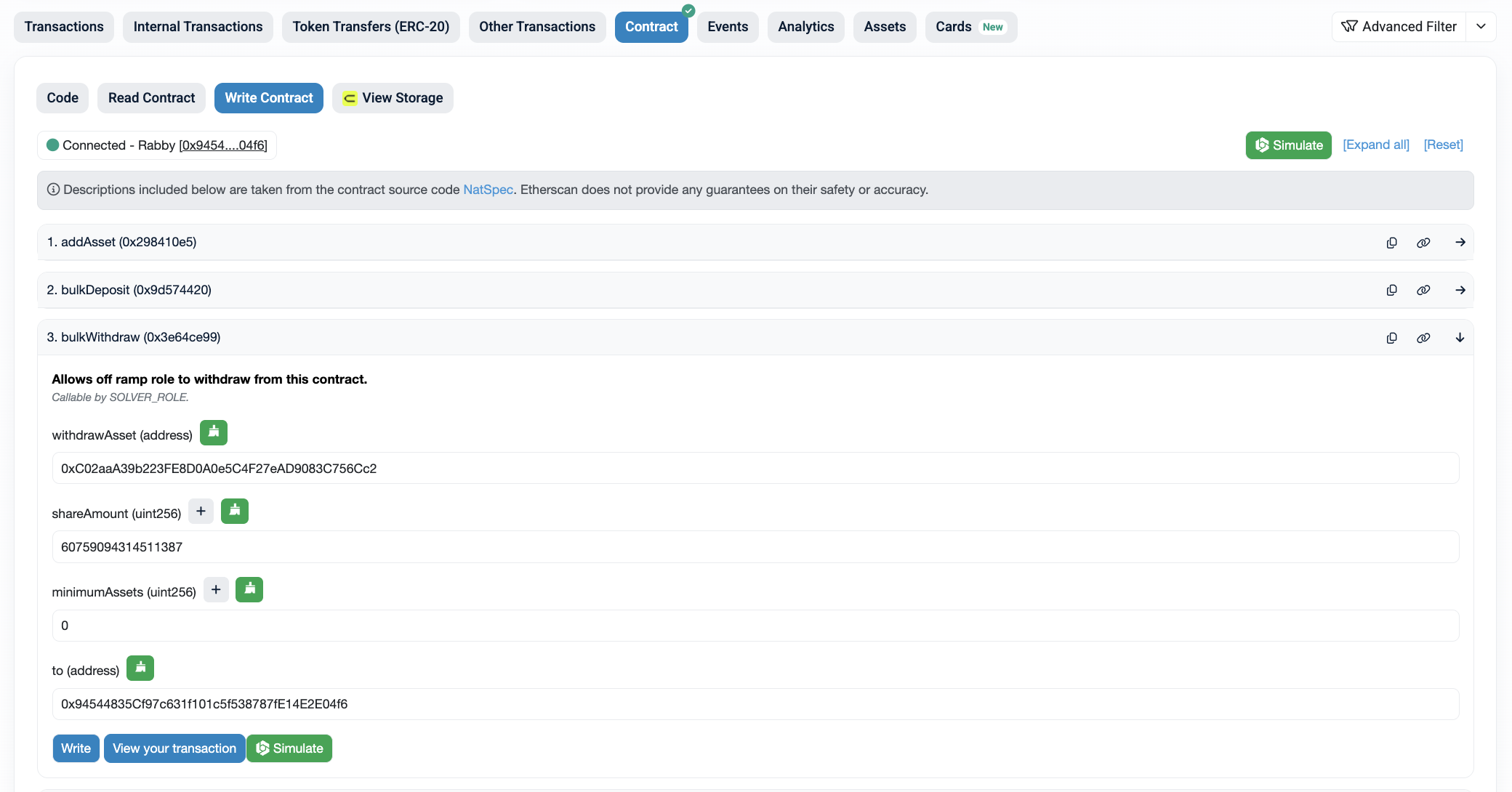
Lastly, go to a block explorer's page for the given `Teller` address and go to the "Write Contract" tab and find the `bulkWithdraw` function.
* Connect your wallet to the block explorer using the "Connect to Web3" button.
* For the `withdrawAsset`, input an address of the asset that you found in step one. Here, it is `0xC02aaA39b223FE8D0A0e5C4F27eAD9083C756Cc2` which is the `WETH` token address.
* For `shareAmount`, input the amount returned from step 2.
* For `minimumAssets`, input zero.
* For `to` address, make sure this is your wallet address. The withdrawn funds will be sent to this address.
* Once you press the "Write" button, you will be prompted for a transaction signature. Once the transaction is complete, you will see that your vault token was burned and that you received the underlying asset.
That's it! Thank you for having been a user of Nucleus.