# Deprecation Guide
### Deprecation Notice
Nucleus protocol is formally deprecated as of 12/19/2025.
Once the frontend is deprecated, the user interface for withdraws will no longer exist. However, the vault as a permissionless protocol will always allow you to withdraw through smart contract interactions. For those who do not have a technical experience, using a block explorer is sufficient and this guide will provide a step by step walk through.
#### Step 1: Identify available assets in the vault
You can use any blockchain explorers available to check assets that are still remaining within the vault. This is an example using the [tETH vault on etherscan.](https://etherscan.io/address/0x19e099B7aEd41FA52718D780dDA74678113C0b32)
* Here, you can see that WETH, weETH, pufETH are the available assets that exist inside the tETH vault.
* You may decide to choose any asset that exists inside the vault as a withdraw asset. You will specify this token in Step 3.
#### Step 2: Get your vault token balance
> For this section, please refer to the [Deployed Assets](https://docs.nucleusearn.io/nucleus-architecture/deployed-assets) section for finding the right contract addresses.
Go to a block explorer's page for the given vault token address. Then query the total amount of vault tokens you have using the `balanceOf` function.
* You can see we are looking at the `tETH` address, and using the `balanceOf` function. Pass in your wallet address as the input. This address has `0.120759094314511387 tETH` tokens.
#### Step 3: Withdraw from the vault
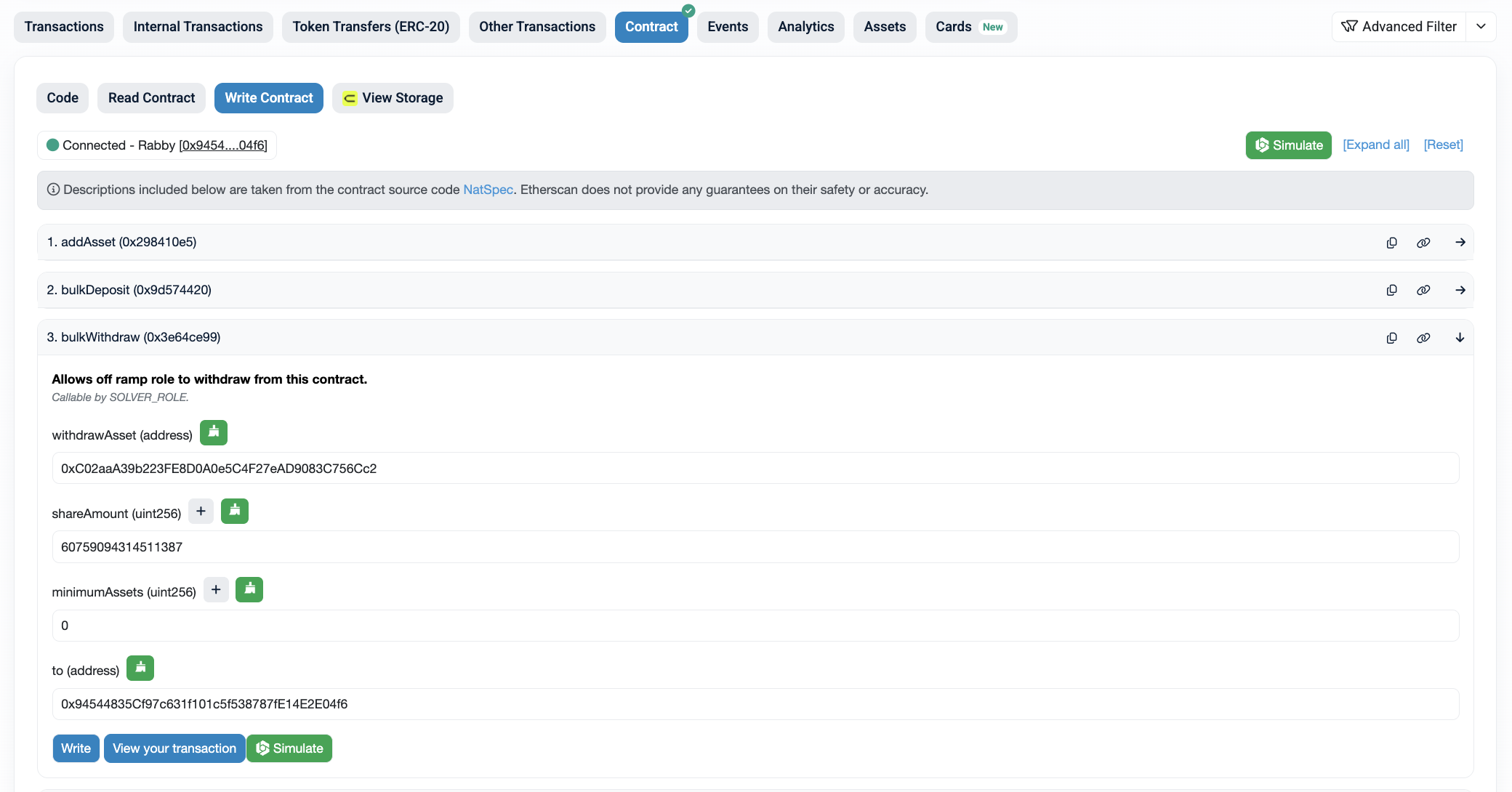
Lastly, go to a block explorer's page for the given `Teller` address and go to the "Write Contract" tab and find the `bulkWithdraw` function.
* Connect your wallet to the block explorer using the "Connect to Web3" button.
* For the `withdrawAsset`, input an address of the asset that you found in step one. Here, it is `0xC02aaA39b223FE8D0A0e5C4F27eAD9083C756Cc2` which is the `WETH` token address.
* For `shareAmount`, input the amount returned from step 2.
* For `minimumAssets`, input zero.
* For `to` address, make sure this is your wallet address. The withdrawn funds will be sent to this address.
* Once you press the "Write" button, you will be prompted for a transaction signature. Once the transaction is complete, you will see that your vault token was burned and that you received the underlying asset.
That's it! Thank you for having been a user of Nucleus.